Elementor V4 is the biggest change to the editor since version 3 arrived in 2020, and it is not an upgrade you are forced to take. Version 4 introduces the Atomic Editor: a new set of lightweight building blocks styled through reusable Classes and Variables, living alongside your existing V3 widgets rather than replacing them overnight.
Elementor V4 is the 2026 release of the WordPress page builder that adds the Atomic Editor: Atomic Elements with clean single-wrapper HTML, reusable Classes and Variables, States and Components. Existing V3 pages keep working unchanged, nothing is converted automatically, and both element types can be mixed on the same page.
- What you keep: every V3 page, template and widget, rendering exactly as before.
- What you gain: lean Atomic Elements, global Classes, Variables, States and Components in one unified Style tab.
- What it costs: a new way of thinking about styling, a few widgets without atomic equivalents yet, and a page-by-page rebuild of whatever you move.
What is Elementor V4 and the Atomic Editor?
Elementor V4 is the current major version of the Elementor WordPress page builder, released as stable on 30 March 2026, and the Atomic Editor is its new building model. Instead of feature-heavy widgets, you compose pages from small Atomic Elements and style them with reusable Classes, Variables, States and Components through one shared Style tab.
The 4.0 beta appeared on 19 March 2026, the stable 4.0.0 release followed on 30 March, and from April 2026 every new Elementor site starts with the Atomic Editor switched on. Existing sites get a notice offering the new elements and can turn them on, or off, at any time under Elementor, Editor, Settings, Atomic Editor in the WordPress admin. Version 4 is part of the free plugin, not a new product.
Each piece of the new vocabulary, briefly:
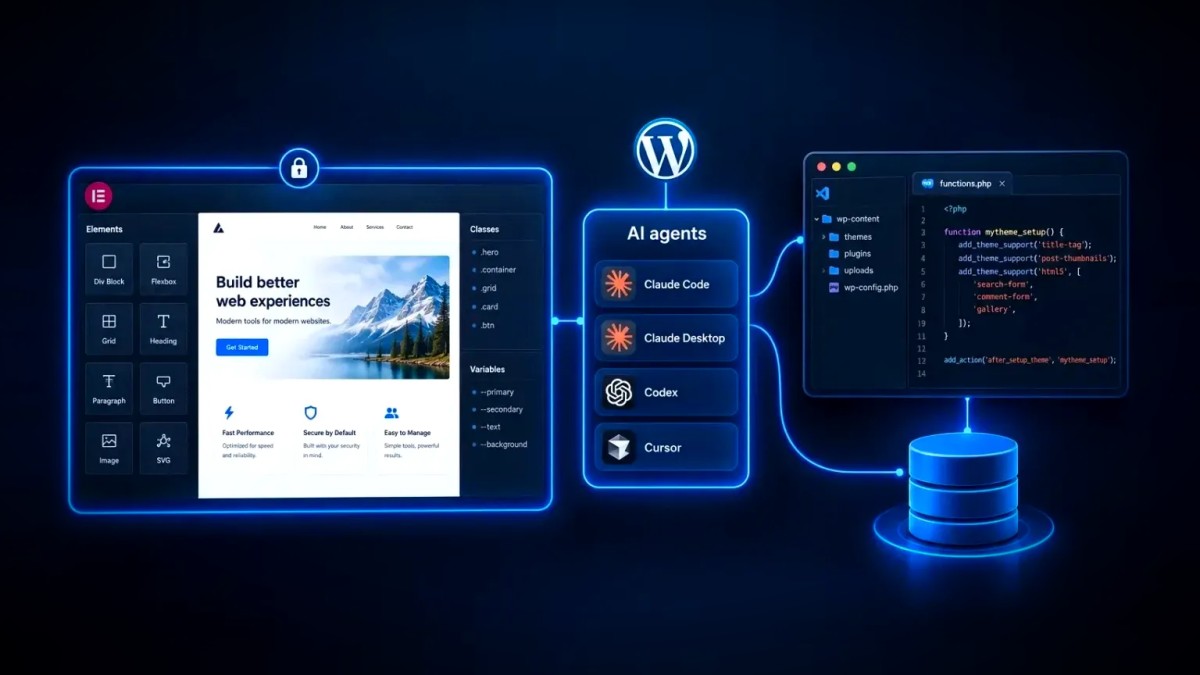
- Atomic Elements: the building blocks. Div Block, Flexbox and Grid handle layout; Heading, Paragraph, Button, Image, SVG, Video, YouTube, Divider and Tabs handle content. Elementor Pro adds atomic Forms, Loops and Interactions. Each renders as plain HTML with a single wrapper.
- Classes: reusable style rules defined once and applied to any Atomic Element, managed in the Class Manager (the limit rose to 1,000 in version 4.1). Change the class and every element using it updates.
- Variables: design tokens for colours, typography and sizes, held in the Variables Manager, so a brand colour lives in one place rather than in hundreds of widget settings.
- States: hover, active and focus styling set on a class or element in the editor, with no custom CSS.
- Components: reusable blocks (a header, a pricing card, a call-to-action strip) whose structure and styling stay in sync wherever they are used, with chosen properties exposed for per-instance editing.
- Unified Style tab: every Atomic Element shares the same Layout, Size, Spacing, Position, Typography, Background, Border and Effects sections, with every property settable per breakpoint.
The atomic side has moved quickly since 4.0. Version 4.1 (26 May 2026) added the Design System panel with import and export of Classes and Variables, plus Angie, Elementor's AI assistant, inside the editor. Version 4.2 (20 July 2026) added the Grid element, with Atomic Loops arriving in Elementor Pro 4.2. The current release at the time of writing is 4.2.4.
Elementor V4 vs V3: what actually changed?
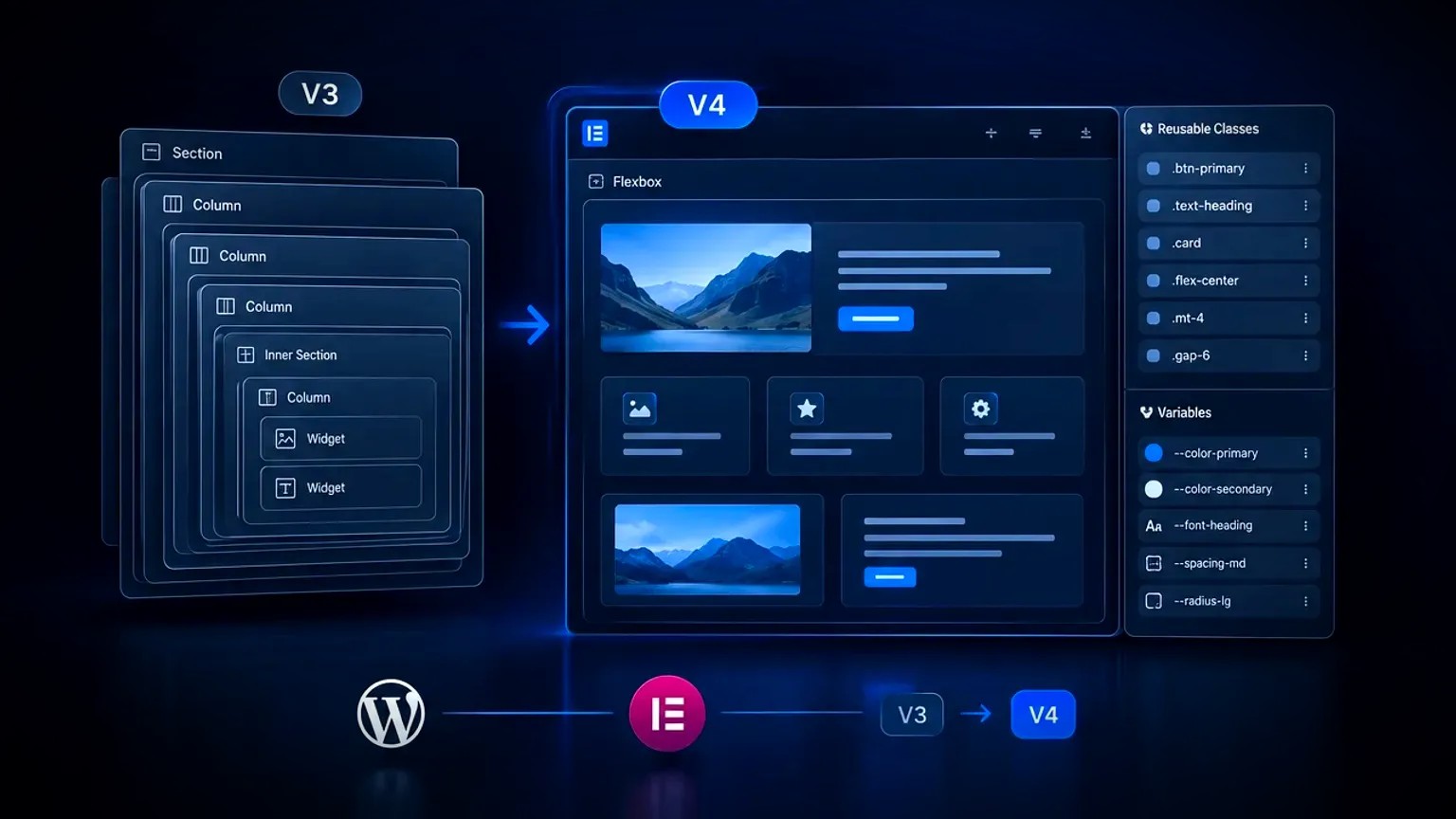
Elementor V4 changes how pages are built and styled, not what they look like. V3 stacks feature-rich widgets inside sections, columns or containers, each styled individually; V4 composes pages from Atomic Elements, styles them through shared Classes and Variables, and outputs far leaner HTML. The table sets the two side by side.
| Area | Elementor V3 | Elementor V4 (Atomic Editor) |
|---|---|---|
| Building blocks | Feature-rich widgets, each with its own option set | Small Atomic Elements composed together |
| Layout | Sections and columns, later Flexbox containers | Div Block, Flexbox and Grid elements with native CSS controls |
| Styling | A different Style tab per widget; settings live on each element | One unified Style tab; styles live in reusable Classes |
| Design tokens | Global Colours and Global Fonts | Variables for colours, typography and sizes, exportable between sites |
| Reuse | Saved templates and global widgets | Components with synced structure and exposed properties |
| HTML output | Several nested wrapper divs per widget | A single wrapper per element |
| Responsive | Selected controls per breakpoint | Every style property per breakpoint, with inherited values |
| Hover and focus | Per-widget hover options only | States (hover, active, focus) on any class or element |
What are the benefits of migrating to Elementor V4?
The benefits of migrating to Elementor V4 are leaner code, a genuine design system and faster ongoing changes. Atomic Elements output a single wrapper and share CSS through Classes, which cuts DOM size as well as stylesheet weight. Variables with Components keep a site consistent, while every new Elementor feature, from Grid to Loops, is built atomic-first.
- Leaner HTML and CSS. Each Atomic Element renders as one wrapper, where a V3 button typically sits inside three or four nested divs before the browser reaches the link, and a style shared through a class is written once rather than once per element. Independent tests published in early 2026 measured 15 to 20 percent fewer DOM nodes on rebuilt pages. Lighthouse warns above roughly 800 DOM nodes and fails above 1,400, because large trees slow style calculation and layout, which feeds straight into Core Web Vitals.
- A real design system. Variables hold the palette, type scale and spacing; Classes hold the reusable rules; Components hold the repeated blocks. Since 4.1 the Design System panel exports and imports all of it, so a staging design system can move to production, or a new client site can start from a standard kit.
- Native layout control. Flexbox and Grid are first-class elements with the real CSS properties exposed (direction, wrap, gap, fractional columns, spans, dense auto-placement), so layouts that once needed custom CSS or an add-on are built visually.
- States and scoped CSS. Hover, active and focus styling sit on the class, which keeps accessible focus styles consistent. Custom CSS, when still needed, is added per element and scoped automatically rather than living in global stylesheets full of hand-written selectors.
- Future-proofing. Forms, Interactions, Grid, Loops, Components and Angie have all shipped on the atomic side. A site built on Atomic Elements today gets each new feature natively.
One honest caveat: the gains scale with how much of a page is atomic. Elementor's own FAQ says the improvement varies when V3 and V4 elements are mixed, and grows as more legacy widgets are replaced. A single atomic hero above an otherwise V3 page will not move a Lighthouse score; a rebuilt page will.
What is still missing in Elementor V4?
Elementor V4 is production-ready but not yet feature-complete. Not every V3 widget has an atomic equivalent. Classes or Variables cannot be applied to legacy widgets, text formatting inside Paragraph or Heading elements is more limited, and some third-party add-ons plus dynamic-content plugins still integrate more deeply with V3. These gaps are why migration is gradual by design.
- Widget coverage. As of mid-2026, accordions, galleries and carousels had no Atomic Element version, so those sections stay on legacy widgets for now. Grid and Loops closed the biggest gap in 4.2; check Elementor's roadmap before planning a full rebuild.
- Legacy widgets sit outside the design system. Classes and Variables are native to Atomic Elements only. The bridge is syncing: colour Variables can feed V3 Global Colours, and typography Classes can feed V3 Global Fonts, so older widgets at least follow the same palette.
- Text formatting. Rich inline formatting, lists and inline HTML inside Paragraph or Heading elements are more restricted than in the V3 Text Editor widget.
- Dynamic content and add-ons. Sites that lean on Advanced Custom Fields, JetEngine or large widget packs should test their workflows on staging; support improved through 4.1 and 4.2 but is not uniform.
Does updating to Elementor V4 break an existing V3 site?
No. Updating an existing site to Elementor 4.x changes nothing on its own: V3 pages keep rendering exactly as before, nothing is converted automatically, and legacy widgets and Atomic Elements can share the same page. Elementor's official position is that you do not need to rebuild existing layouts, and the Atomic Editor can be disabled at any time.
That position is set out in Elementor's Version 4 FAQ, and it holds up in practice. The plugin update is the routine update it has always been; the Atomic Editor is a feature you switch on. The risks that remain are the ordinary ones, sharpened slightly:
- Add-on compatibility. Third-party widget packs needed updates for 4.x, and some still target V3 only. Update everything on staging first.
- Custom CSS aimed at old markup. Handwritten CSS that targets V3 wrapper classes will not apply to Atomic Elements. Treat that as the prompt to move those rules into Classes.
- Two systems on one site. Nothing breaks, but a half-migrated site is harder to maintain unless someone decides, then writes down, which pages are atomic.
- Backups and rollback. Take a full database plus files backup before the update, no exceptions, then make sure you know how to disable the Atomic Editor: that is the quickest rollback.
How do you migrate from Elementor V3 to V4?
You migrate from Elementor V3 to V4 gradually, page by page, in a deliberate order: audit, stage, build the design system, start with new pages, then rebuild the pages that matter most. There is no conversion tool, so the work is a rebuild, but one you control, with V3 pages untouched until you choose to move them.
- Audit the site. List every page and template, the widgets each uses, the add-ons installed, any custom CSS, and where dynamic content comes from. Mark which widgets already have an atomic equivalent.
- Back up and stage. Take a full backup, clone the site to staging, update Elementor and Elementor Pro to the current 4.x release along with every add-on, then check the front end of key pages before touching the editor.
- Build the design system first. Create Variables for the palette, type scale and spacing, then Classes for the recurring patterns (headings, body text, buttons, cards, section padding). Turn on syncing so colour Variables feed V3 Global Colours while typography Classes feed V3 Global Fonts; legacy widgets then follow the same tokens.
- Start with new work. Build every new page, landing page and template with Atomic Elements only, then turn repeated sections into Components. This trains the team without risking live pages.
- Rebuild high-value pages section by section. Home, service and top landing pages first. Replace each V3 section with an atomic one, keeping legacy widgets where no atomic version exists yet. Leave URLs, heading structure, internal links and schema identical so nothing changes for search.
- Measure before and after. Record Lighthouse DOM size, CSS weight, Largest Contentful Paint and Interaction to Next Paint for each rebuilt page. The numbers justify the effort, then show when a mixed page is not yet worth moving.
- Retire V3 deliberately. As Elementor ships new Atomic Elements, replace the remaining widgets, remove unused add-ons, then clear out the custom CSS that Classes made redundant. Keep the option to disable the Atomic Editor until the last V3 dependency is gone.
Elementor Pro sites with Loop Grid templates have a bridge: an Atomic Loop can load an existing V3 Loop Item template inside it, which keeps dynamic listings working while the item template is rebuilt.
Should you migrate to Elementor V4 now or wait?
Migrate now if you are starting a new site, or if a live site's performance and consistency problems are costing you leads; wait, but start the design system, if your site depends on widgets or add-ons that are still V3-only. Elementor V4 is stable and the direction of travel is clear, so the question is timing, not whether.
- New site: build on V4 from day one. New installs default to it and there is nothing to migrate.
- Established marketing site with a modest widget set: migrate the pages that earn money first, over a few weeks, then the rest. This is where the Core Web Vitals and consistency gains show most.
- Content-heavy or heavily customised site: start with Variables, Classes and new pages, keeping the rest on V3 until the widgets you rely on exist as Atomic Elements.
- Agency or in-house team running many sites: build one exportable design system now, because every future site starts from it.
Whichever path fits, treat the migration as a structured project with an audit, a staging environment and measurement, the same discipline behind any well-run WordPress and Elementor build, rather than a series of ad hoc edits.
Elementor V4 migration checklist
Use this list to judge whether a migration is genuinely done.
- Full backup taken, staging site updated to the current Elementor 4.x, every add-on checked
- Variables defined for colours, typography and spacing, with syncing to V3 global styles turned on
- Classes created for every recurring pattern, Components for every repeated section
- New pages built with Atomic Elements only; high-value existing pages rebuilt section by section
- Legacy widgets kept only where no atomic equivalent exists, with a note of what replaces them later
- URLs, headings, internal links and schema unchanged on every rebuilt page
- Lighthouse DOM size, CSS weight, LCP and INP recorded before and after each rebuild
- Rollback path documented, including how to disable the Atomic Editor
Elementor V4 does not force anything on you, which is exactly why it is easy to leave for later. The sites that benefit are the ones that treat it as a system to adopt, not a switch to flip.
Frequently asked questions
What is the difference between Elementor V3 and V4?
Elementor V3 builds pages from feature-rich widgets, each styled through its own settings, inside sections, columns or containers. Elementor V4 adds the Atomic Editor: small Atomic Elements that render as a single HTML wrapper and are styled through reusable Classes, Variables, States and Components in one shared Style tab. V4 produces leaner code with a proper design system; V3 still has the wider widget library.
Does Elementor V4 automatically convert V3 pages?
No. Updating to Elementor 4.x converts nothing. Existing V3 pages render exactly as before, legacy widgets and Atomic Elements can sit on the same page, and the Atomic Editor can be switched off under Elementor, Editor, Settings in the WordPress admin. Elementor's getting started guide for Editor V4 covers the new elements. For help planning a migration, get in touch.
Is Elementor V4 faster than V3?
Pages built with Atomic Elements are typically lighter than the same pages in V3, because each element outputs one wrapper instead of several nested divs, while shared styles are written once in a class. Independent tests reported 15 to 20 percent fewer DOM nodes on rebuilt pages. The gain scales with how much of a page is atomic, so a mixed page improves less than a full rebuild.
Can you use V3 widgets and Atomic Elements on the same page?
Yes. Elementor V4 is designed for gradual adoption, so legacy widgets and Atomic Elements can be combined on one page or across one site. The limits are that Classes and Variables apply only to Atomic Elements, so performance gains stay partial until the older widgets are replaced. Syncing colour Variables to Global Colours keeps both sides on the same palette.
Do you need Elementor Pro for Version 4?
No. Version 4 is part of the free Elementor plugin, including Atomic Elements, Classes, Variables, States, Components and the Grid element. Elementor Pro adds the atomic Forms, Interactions and Loops, along with its existing Pro widgets. Version 4 is not a separate product or subscription.
When should you migrate an existing site to Elementor V4?
Migrate when the site depends mostly on widgets that already have atomic equivalents, when its performance or consistency is costing conversions, or when a redesign is planned anyway. Start every migration with Variables and Classes, move new pages first, then rebuild high-value pages section by section on staging with before-and-after measurements.